RecognitionFeatured
Featured on CNN
CNNCNNMedia recognition
Bring a clip or start with an idea. Tell VibeEdit what you want, and it edits the footage or creates the scenes for you. Refine the result in chat, with no editing software to learn.
See the possibilities
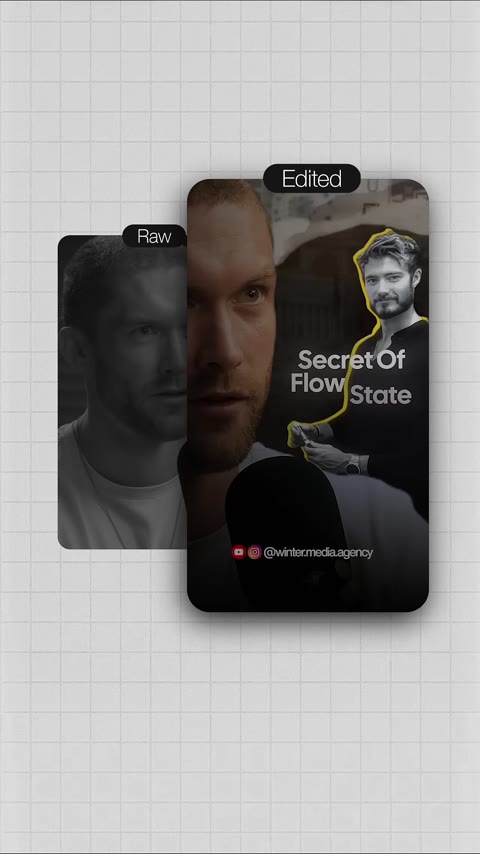
Podcast short, before → after
Make this a punchy vertical short with clean captions and b-roll.
I’m finding the strongest opening and lining up tighter cuts, captions, and cutaways.
Make the opening faster and captions bigger.
Done — I tightened the opening and increased the caption size.
Make this a punchy vertical short with clean captions and b-roll.
Supplied video references with illustrative VibeEdit conversations. Raw and edited footage shown together by Winter Media Agency. Explore all 11 examples →
Start with footage, a prompt, or our sample. A card is required to activate the 7-day trial with 300 credits; you can cancel before it renews.
No editing software to master
No timelines, keyframes, caption menus, or color wheels to learn. Describe the video you want, and VibeEdit handles the editing work.
One editor. Every workflow.





“I’m really happy with VibeEdit — it’s easy to pick up and easy to recommend.”
“I really like VibeEdit — the whole experience feels smooth and natural.”
“VibeEdit has won me over — I’m always happy to come back to it.”
Featured on CNN
“Honestly, I’m a big fan of VibeEdit — it’s thoughtful, polished, and welcoming.”
“I’ve come to rely on VibeEdit — it’s easy to pick up and easy to recommend.”
“I’m really happy with VibeEdit — it’s thoughtful, polished, and welcoming.”
“VibeEdit has won me over — it makes the creative side feel fun.”
“VibeEdit is such a nice product — the whole experience feels smooth and natural.”
“I’ve come to rely on VibeEdit — I’m always happy to come back to it.”
“I’m really happy with VibeEdit — it’s easy to pick up and easy to recommend.”
Featured on CNN
“I’m really happy with VibeEdit — it’s thoughtful, polished, and welcoming.”
“I’ve come to rely on VibeEdit — I’m always happy to come back to it.”
“I really like VibeEdit — the whole experience feels smooth and natural.”
“Honestly, I’m a big fan of VibeEdit — it’s thoughtful, polished, and welcoming.”
“VibeEdit has won me over — it makes the creative side feel fun.”
“VibeEdit has won me over — I’m always happy to come back to it.”
“I’ve come to rely on VibeEdit — it’s easy to pick up and easy to recommend.”
“VibeEdit is such a nice product — the whole experience feels smooth and natural.”
Reviews supplied by the VibeEdit team. Creator portraits are illustrative.
How it works
Whether you bring footage or start from a sentence, the loop is the same: direct, review, refine, and export.
Upload a clip, add notes, or start with an idea. Everything stays together in your project.
Project materials
Podcast footage
Clip + project notes
Describe the edit in plain language. Otto uses your footage and instructions to build a video.
Ask Otto
“Make this a punchy vertical short with clean captions.”
Play the result, then ask for a faster opening, different captions, or another adjustment.
Review the edit
“Make the opening faster.”
When it looks right, export the finished video and share it wherever you want.
Finished video.mp4
Ready to share
What it actually does
The tedious 90% of editing — cutting silences, matching color, syncing captions, balancing audio — happens automatically. You review the result, not the timeline.
Every 'um,' pause, and silence gets found and cut automatically — the pacing a good editor would give you, without the hours.
Footage from different takes, lights, or cameras gets graded to look like one shoot — no color panel, no guesswork.
Audio comes out broadcast-level and consistent, clip to clip — the kind of mix that used to mean hiring someone.
Word-synced, styled, and burned in — the format that keeps people watching with the sound off.
Need b-roll you didn't film, a title card, or a voiceover line? Ask, and it generates just that piece to drop into your edit.
Speed changes that don't ruin the pitch, backgrounds removed cleanly — the effects that usually mean a trip to After Effects.
Who it's for
Bring your footage and tell it what you want. VibeEdit removes the editing bottleneck so you can publish more.
Turn long uploads, podcasts, and streams into scroll-stopping shorts — all by chatting.
Produce on-brand client videos at scale — the brand kit keeps every cut consistent.
Spin up product demos, ads, and social clips from a sentence — no editor, no timeline.
Cut lectures into tight explainers, add captions and lower-thirds by describing them.
Ship launch videos, updates, and demos in-house — no editor to hire, no skills to learn.
Turn one episode into a week of vertical clips — best moments found, reframed, and captioned.
VibeFlows · powered by Modal
Start from a prompt or connect creative steps yourself: reference images, motion, style, upscaling, and output. Simple recipes keep you moving; the advanced workflow view gives you control when you want it.
Explore AI workflows →One workspace for directing, generating, editing, and shipping.
Pricing
Start with a 7-day trial. Your subscription includes the editor, Otto, and monthly credits for edits, exports, and generated media.
$49/ month after trial
Included every paid month
3,000 credits
300 credits for the entire 7-day trial. Card required. $49/month after the trial unless you cancel.
See credit costs and an example →Start with conversation, then take over any layer, cut, keyframe, effect, or transition in the visual editor.
They generate new pixels — you get a clip, not your clip. VibeEdit edits the footage you actually shot. Review the preview, then tell it what to change. Your project keeps the editing instructions so you can iterate.
Upload any .mp4 or .mov, then describe the edit in chat. 'Trim the filler words, warm grade, burn captions' is enough. The agent transcribes, cuts on word boundaries, grades, syncs captions, and normalizes loudness — no timeline needed.
Trim to word boundaries, auto color-grade each segment, burn sync'd captions, normalize loudness (−14 LUFS), chroma key, speed ramp, reframe to vertical, mix and duck audio, layer b-roll and overlays, and pull the best moments of a long video into shorts.
That's what it's built for — editing the video you shot. But when you're missing a piece (b-roll of a thing you name, a title card, a voiceover line), it can generate just that to fill the gap. The footage is the star; generation is fill.
Yes — h.264 with normalized audio. Drag it straight into your CMS or publishing tool.
The agent samples each clip's luma and saturation, then applies subtle ±8% corrections so segments look balanced. Override with 'warm cinematic' or 'skip grade' in chat.
No. Edit and preview in your browser. Exports can run on supported devices or on our server; keep the tab open during a device export.
Tell it. 'Tighten the cut at 0:42.' 'Drop the white flash.' Shift-click any preview frame to edit at that timestamp.
Yes. Drop images, video, and audio into the project. Brand kits apply your logo, colors, and host identity across every new project — available on every plan.
Yes. Drop any footage into the project, say 'add captions', and the agent transcribes, generates word-level offsets, styles them (2-word chunks, bold white pill), and burns them permanently into the export. Transcription works out of the box — no key needed.
Bring your footage and tell it what you want. The edit you'd spend an afternoon on in Premiere, done by asking.